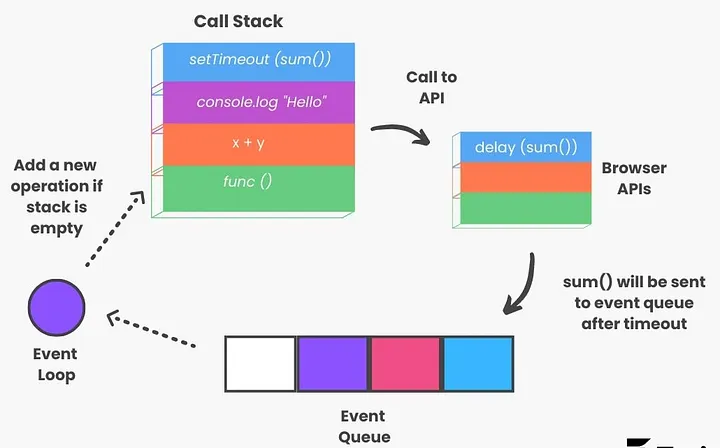
Have you ever wondered why some pieces of JavaScript code seem to run out of order? The key to understanding this is the event loop.
JavaScript's event loop can be tricky to understand, especially when dealing with different types of asynchronous operations. In this article, we'll break down how JavaScript handles synchronous and asynchronous code, microtasks and macrotasks, and why certain things happen in a specific order.
Synchronous and Asynchronous Codes
JavaScript handles operations in two main ways: synchronous and asynchronous. Understanding the difference between them is key to grasping how JavaScript handles tasks and how to write efficient and non-blocking code.
What are Synchronous Code?
Synchronous code is the default in JavaScript, meaning each line runs one after another in sequence. For example:
javascriptconsole.log("First");
console.log("Second");
This will output:
bashFirst
Second
What are Asynchronous Code?
Asynchronous code on the other hand allows certain tasks to run in the background and complete later, without blocking the rest of the code. Functions like setTimeout() or Promise are examples of asynchronous code.
Here's a simple example of asynchronous code using setTimeout():
javascriptconsole.log("First");

setTimeout(() => {
  console.log("Second");
}, 0);

console.log("Third");
This will output:
bashFirst
Third
Second
Asynchronous Patterns in JavaScript:
There are a few ways to handle asynchronous operations in JavaScript:
- Callbacks: A function passed as an argument to another function, and executed after the first function has completed its task.
Code Sample:
javascriptconsole.log("Start");

function asyncTask(callback) {
  setTimeout(() => {
    console.log("Async task completed");
    callback();
  }, 2000);
}

asyncTask(() => {
  console.log("Task finished");
});

console.log("End");
- Promises: A promise represents a future value (or error) that will eventually be returned by the asynchronous function.
Code Sample:
javascriptconsole.log("Start");

const asyncTask = new Promise((resolve) => {
  setTimeout(() => {
    console.log("Async task completed");
    resolve();
  }, 2000);
});

asyncTask.then(() => {
  console.log("Task finished");
});

console.log("End");
- Async/Await: Async/await is syntactic sugar built on top of promises, allowing us to write asynchronous code that looks synchronous.
Code Sample:
javascriptconsole.log("Start");

async function asyncTask() {
  await new Promise((resolve) => {
    setTimeout(() => {
      console.log("Async task completed");
      resolve();
    }, 2000);
  });

  console.log("Task finished");
}

asyncTask();

console.log("End");
Synchronous vs Asynchronous Code
To better understand each of these method of execution of javascript and how they differs from each either, here is an elaborate differences across multiple aspect of javascript functions.
| Aspect | Synchronous Code | Asynchronous Code |
|---|---|---|
| Execution Order | Executes line by line in a sequential manner | Allows tasks to run in the background while other code continues to execute |
| Performance | Can lead to performance issues if long-running tasks are involved | Better performance for I/O-bound operations; prevents UI freezing in browser environments |
| Code Complexity | Generally simpler and easier to read | Can be more complex, especially with nested callbacks (callback hell) |
| Memory Usage | May use more memory if waiting for long operations | Generally more memory-efficient for long-running tasks |
| Scalability | Less scalable for applications with many concurrent operations | More scalable, especially for applications handling multiple simultaneous operations |
This comparison highlights the key differences between synchronous and asynchronous code, helping developers choose the appropriate approach based on their specific use case and performance requirements.
Microtasks and Macrotasks
In JavaScript, microtasks and macrotasks are two types of tasks that are queued and executed in different parts of the event loop, which determines how JavaScript handles asynchronous operations.
Microtasks and macrotasks are both queued and executed in the event loop, but they have different priorities and execution contexts. Microtasks are processed continuously until the microtask queue is empty before moving on to the next task in the macrotask queue. Macrotasks, on the other hand, are executed after the microtask queue has been emptied and before the next event loop cycle starts.
What are Microtasks
Microtasks are tasks that need to be executed after the current operation completes but before the next event loop cycle starts. Microtasks get priority over macrotasks and are processed continuously until the microtask queue is empty before moving on to the next task in the macrotask queue.
Examples of microtasks:
- Promises (when using
.then()or.catch()handlers) - MutationObserver callbacks (used to observe changes to the DOM)
- Some
process.nextTick()in Node.js
Code Sample
javascriptconsole.log("Start");

Promise.resolve().then(() => {
  console.log("Microtask");
});

console.log("End");
Output:
bashStart
End
Microtask
Explanation:
- The code first logs "Start", which is synchronous.
- The promise handler (Microtask) is queued as microtask.
- The "End" is logged (synchronous), then the event loop processes the microtask, logging "Microtask".
What are Macrotasks
Macrotasks are tasks that are executed after the microtask queue has been emptied and before the next event loop cycle starts. These tasks represent operations like I/O or rendering and are usually scheduled after a certain event or after a delay.
Examples of macrotasks:
- setTimeout()
- setInterval()
- setImmediate() (in Node.js)
- I/O callbacks (file reading/writing)
- UI rendering tasks (in browsers)
Code Example:
javascriptconsole.log("Start");

setTimeout(() => {
  console.log("Macrotask");
}, 0);

console.log("End");
Output:
bashStart
End
Macrotask
Explanation:
- The code first logs "Start", which is synchronous.
- The setTimeout() (macrotask) is queued.
- The "End" is logged (synchronous), then the event loop processes the macrotask, logging "Macrotask".
Microtasks vs Macrotasks
| Aspect | Microtasks | Macrotasks |
|---|---|---|
| Execution Timing | Executed immediately after the current script, before rendering | Executed in the next event loop iteration |
| Queue Priority | Higher priority, processed before macrotasks | Lower priority, processed after all microtasks are complete |
| Examples | Promises, queueMicrotask(), MutationObserver | setTimeout(), setInterval(), I/O operations, UI rendering |
| Use Case | For tasks that need to be executed as soon as possible without yielding to the event loop | For tasks that can be deferred or don't require immediate execution |
The Event Loop
The event loop is a fundamental concept in JavaScript that enables non-blocking asynchronous operations despite JavaScript being single-threaded. It's responsible for handling asynchronous callbacks and ensuring that JavaScript continues to run smoothly without getting blocked by time-consuming operations.
What is the Event Loop
The event loop is a mechanism that allows JavaScript to handle asynchronous operations efficiently. It continuously checks the call stack and the task queue (or microtask queue) to determine which function should be executed next.
To understand the event loop better, it's important to know how JavaScript works internally. It is important to note that JavaScript is a single-threaded language, meaning it can only do one thing at a time. There's only one call stack, which stores the functions to be executed. This makes synchronous code straightforward, but it poses a problem for tasks like fetching data from a server or setting a timeout, which take time to complete. Without the event loop, JavaScript would be stuck waiting for these tasks, and nothing else would happen.
How the Event Loop Works
1. Call Stack:
The call stack is where the function currently being executed is kept. JavaScript adds and removes functions from the call stack as it processes code.
2. Asynchronous Task Starts:
When an asynchronous task like setTimeout, fetch, or Promise is encountered, JavaScript delegates that task to the browser's Web APIs (like Timer API, Network API, etc.), which handle the task in the background.
3. Task Moves to the Task Queue:
Once the asynchronous task completes (e.g., the timer finishes, or data is received from the server), the callback (the function to handle the result) is moved to the task queue (or microtask queue in the case of promises).
4. Call Stack Finishes Current Execution:
JavaScript continues executing the synchronous code. Once the call stack is empty, the event loop picks up the first task from the task queue (or microtask queue) and places it on the call stack for execution.
5. Repeat:
This process repeats. The event loop ensures that all the asynchronous tasks are handled after the current synchronous tasks are done.
Examples
Now that we a better and clearer understanding of how the event loop works, let's look at some examples to solidify our understanding.
Example 1: Timer with Promises and Event Loop
javascriptfunction exampleOne() {
  console.log("Start");

  setTimeout(() => {
    console.log("Timeout done");
  }, 1000);

  Promise.resolve().then(() => {
    console.log("Resolved");
  });

  console.log("End");
}

exampleOne();
Output:
bashStart
End
Resolved
Timeout done
Explanation:
- Step 1: "Start" is printed (synchronous).
- Step 2: setTimeout schedules the "Timeout done" message after 1 second (macrotask queue).
- Step 3: A promise is resolved, and the "Resolved" message is pushed to the microtask queue.
- Step 4: "End" is printed (synchronous).
- Step 5: The call stack is now empty, so the microtask queue runs first, printing "Resolved".
- Step 6: After 1 second, the macrotask queue runs, printing "Timeout done".
Example 2: Nested Promises and Timers
javascriptfunction exampleTwo() {
  console.log("Start");

  setTimeout(() => {
    console.log("Timer 1");
  }, 0);

  Promise.resolve().then(() => {
    console.log("Promise 1 Resolved");

    setTimeout(() => {
      console.log("Timer 2");
    }, 0);

    return Promise.resolve().then(() => {
      console.log("Promise 2 Resolved");
    });
  });

  console.log("End");
}

exampleTwo();
Output:
bashStart
End
Promise 1 Resolved
Promise 2 Resolved
Timer 1
Timer 2
Explanation:
- Step 1: "Start" is printed (synchronous).
- Step 2: The first setTimeout schedules "Timer 1" to run (macrotask queue).
- Step 3: The promise resolves, and its callback is pushed to the microtask queue.
- Step 4: "End" is printed (synchronous).
- Step 5: The microtask queue runs first:
- "Promise 1 Resolved" is printed.
- "Timer 2" is scheduled (macrotask queue).
- Another promise is resolved, and "Promise 2 Resolved" is printed.
- Step 6: The macrotask queue is processed next:
- "Timer 1" is printed.
- "Timer 2" is printed last.
Example 3: Mixed Synchronous and Asynchronous Operations
javascriptfunction exampleThree() {
  console.log("Step 1: Synchronous");

  setTimeout(() => {
    console.log("Step 2: Timeout 1");
  }, 0);

  Promise.resolve().then(() => {
    console.log("Step 3: Promise 1 Resolved");

    Promise.resolve().then(() => {
      console.log("Step 4: Promise 2 Resolved");
    });

    setTimeout(() => {
      console.log("Step 5: Timeout 2");
    }, 0);
  });

  setTimeout(() => {
    console.log(
      "Step 6: Immediate (using setTimeout with 0 delay as fallback)",
    );
  }, 0);

  console.log("Step 7: Synchronous End");
}

exampleThree();
Output:
bashStep 1: Synchronous
Step 7: Synchronous End
Step 3: Promise 1 Resolved
Step 4: Promise 2 Resolved
Step 2: Timeout 1
Step 6: Immediate (using setTimeout with 0 delay as fallback)
Step 5: Timeout 2
Explanation:
- Step 1: "Step 1: Synchronous" is printed (synchronous).
- Step 2: The first setTimeout schedules "Step 2: Timeout 1" (macrotask queue).
- Step 3: A promise resolves, scheduling "Step 3: Promise 1 Resolved" (microtask queue).
- Step 4: Another synchronous log, "Step 7: Synchronous End", is printed.
- Step 5: Microtask queue is processed:
- "Step 3: Promise 1 Resolved" is printed.
- "Step 4: Promise 2 Resolved" is printed (nested microtask).
- Step 6: The macrotask queue is processed:
- "Step 2: Timeout 1" is printed.
- "Step 6: Immediate (using setTimeout with 0 delay as fallback)" is printed.
- "Step 5: Timeout 2" is printed last.
Conclusion
In JavaScript, mastering synchronous and asynchronous operations, as well as understanding the event loop and how it handles tasks, is crucial for writing efficient and performant applications.
- Synchronous functions run in sequence, blocking subsequent code until completion, while asynchronous functions (like setTimeout and promises) allow for non-blocking behavior, enabling efficient multitasking.
- Microtasks (such as promises) have higher priority than macrotasks (such as setTimeout), meaning that the event loop processes microtasks immediately after the current execution, before moving to the macrotask queue.
- The event loop is the core mechanism that allows JavaScript to handle asynchronous code by managing the execution order of tasks and ensuring that the call stack is clear before processing the next queue (microtask or macrotask).
The examples provided progressively illustrated the interaction between synchronous code, promises, timers, and the event loop. Understanding these concepts is key to mastering asynchronous programming in JavaScript, ensuring your code runs efficiently and avoids common pitfalls such as race conditions or unexpected execution orders.
Stay Updated and Connected
To ensure you don't miss any part of this series and to connect with me for more in-depth discussions on Software Development (Web, Server, Mobile or Scraping / Automation), push notifications, and other exciting tech topics, follow me on:
Stay tuned and happy coding 👨💻🚀